Next.js 16.3 Upgrade: What Actually Changes and What It Costs
Next.js 16.3 splits into a free performance upgrade and an opt-in migration. What each half costs, measured on a production headless build.
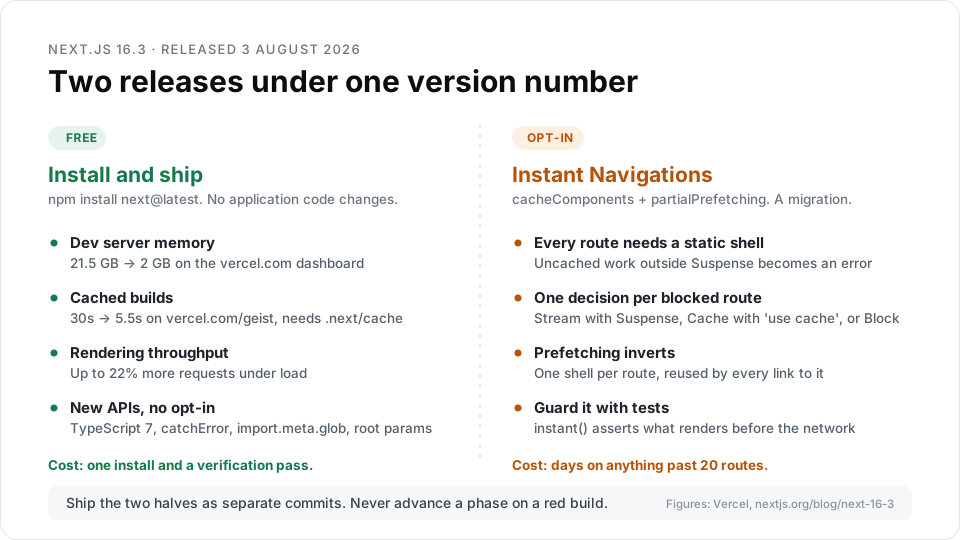
Next.js 16.3 shipped on 3 August 2026 and splits cleanly in two. Everything in the first half is free: Turbopack cut dev server memory on the vercel.com dashboard from 21.5 GB to 2 GB, and cached builds ran 5.5 times faster on vercel.com/geist. The second half, Instant Navigations, is a real migration.

TL;DR
- Upgrading to Next.js 16.3 with zero opt-ins gives lower dev memory, cached builds, and up to 22% more requests handled under load.
- Cache Components (
cacheComponents: true) and Partial Prefetching (partialPrefetching: true) are opt-in flags, and Vercel says both will become default in a future major version. - The build cache lives in
.next/cache. If your CI does not restore that directory, the faster-build number does not apply to you. - On our own headless build, 29
'use cache'directives across 13 files were the price of the Cache Components half. - Treat the two halves as separate releases with separate commits. Conflating them is how the upgrade turns into a bad week.
What is Next.js 16.3?
Next.js 16.3 is a minor release of the React framework, published by Vercel on 3 August 2026, that improves compiler and runtime performance for every app while introducing an opt-in navigation model called Instant Navigations. It is the largest update since Next.js 16.0 arrived in November 2025.
The distinction that matters for planning: one set of changes needs no application code, and one set changes how you think about caching.
What do you get without touching application code?
These land the moment you install next@16.3. All numbers below are Vercel's own benchmarks, taken from the Next.js 16.3 release post and its companion Turbopack post. The cold-start figure appears only in the Turbopack post, where it is attributed to a change in how HMR subscriptions track loaded chunks.
| Change | Measured result | Condition |
|---|---|---|
| Dev server memory, vercel.com dashboard | 21.5 GB down to 2 GB after compiling 50 routes | On by default |
| Dev server memory, nextjs.org | 4,600 MB down to 840 MB, about 82% less | On by default |
| Cached build, vercel.com/geist | 30s down to 5.5s, about 5.5x faster | Needs .next/cache restored |
| Cached build, nextjs.org | 21s down to 9.2s, about 2.3x faster | Needs .next/cache restored |
| Server-side rendering throughput | Up to 22% more requests under load | Automatic |
| Dev server cold start | Over 15% faster on complex apps | Automatic |
Two of those rows carry an asterisk worth reading twice.
The memory win comes from Turbopack memory eviction, which depends on the development filesystem cache introduced in Next.js 16.1. Both are on by default in 16.3. Vercel is explicit that no single reduction percentage applies to every application, because the result depends on the size of your route graph and how much of it you touched during the session.
The build win depends entirely on your CI. Turbopack writes its persistent cache to .next/cache, so a pipeline that starts from a clean checkout every run reads nothing and saves nothing. Add a cache step first, then measure. Our website speed optimization work runs the same check on client pipelines before anyone quotes a build-time improvement.
Four smaller additions arrive in the same free tier: catchError for error boundaries that no longer swallow notFound and redirect, import.meta.glob for Turbopack-only glob imports, root params through next/root-params, and TypeScript 7 support for next build type checking. The Next.js release post describes TypeScript 7, released the month before, as a 10x faster native port with much faster type checking.
Should you enable Cache Components right away?
Not on the same day you bump the version. Cache Components is a programming-model change, and it is the half that generates work.
The rule is short. Nothing is cached unless you say so, and anything uncached that renders outside a <Suspense> boundary becomes an error you have to resolve. Every route has to be able to produce a static shell.
For each blocked route the framework gives you exactly three options and refuses to choose:
- Stream with
<Suspense>. Correct when the data is genuinely per-request and the user benefits from seeing the rest of the page first. - Cache with
'use cache'. Correct when the data is shared across users and tolerates a staleness window. Pick thecacheLifeprofile from how stale the data may actually be, not from what silences the error. - Block with
export const instant = false. A deliberate statement that this route may block. Leave a comment explaining why, or it becomes permanent by accident.
One prerequisite is easy to miss until the flag is already on: Cache Components requires the Node.js runtime. Any route still exporting the deprecated runtime = 'edge' has to move first, and Vercel does not guarantee other server-side JavaScript runtimes. Find those routes before you set the flag, not after the build turns red.
The judgement call is the work. On a small app you can go straight through. On anything past roughly 20 routes, opt every route out first, land a green build as one mechanical commit, then remove the opt-outs one route at a time.
How does Partial Prefetching invert the old advice?
Before 16.3, Next.js sent a prefetch request for every link in the viewport. A sidebar with twenty chat links produced twenty requests, as the Instant Navigations announcement shows in its own network traces. With partialPrefetching: true, Next.js prefetches one reusable shell per route instead, and caches it on the client for the session.
Andrew Clark and Josh Story, who wrote the Instant Navigations announcement, were blunt about the old behavior: "Many of you told us that this looked ridiculous, and frankly, we agree."
That flips what <Link prefetch={true}> means. It stopped being a general speed hint. It now asks for content beyond the shell, at a cost of one server invocation per visible link.
| Link destination | What to do with prefetch={true} |
|---|---|
Fully static, or already behind 'use cache' | Remove it. The shell already covers this |
| Uncached content you want ready before the click | Cache it, then remove the prop |
Content that depends on cookies() or headers() | Remove it. The framework caches that shell per session already |
Content that reads params or searchParams | Keep it. This is what per-link prefetching is for |
| Real-time data that must be fresh per request | Remove it and let the route stream |
Partial Prefetching requires Cache Components. The partialPrefetching reference states that without cacheComponents, both next dev and next build throw at config validation. The two flags move together or not at all.
One detail from that reference is easy to miss. Routes that read cookies() or headers() still produce a shell, because the framework detects the session dependency and caches the shell per session on the client. Routes that read params or searchParams do not, because that content is URL-specific and resolves after navigation.
Vercel also shipped three tools that make this half verifiable: Instant Insights surfaces slow navigations as development errors, the Navigation Inspector pauses a navigation at the shell so you can see what the user would actually see, and the instant() Playwright helper asserts what is visible before the network resolves. The Playwright test is the durable artifact. Prefetching is production-only, so next dev will never feel instant and proves nothing.
What our own migration measured
Our agency site runs headless Next.js in front of a WordPress GraphQL backend, and it adopted Cache Components ahead of the 16.3 stable release. Numbers below come from a static scan of the repository on 14 August 2026, not from an estimate.
The site covers 15 route entry points and 256 blog posts, all served from one shared WordPress origin.
Adopting Cache Components cost 29 'use cache' directives across 13 files. Fourteen of them sit in a single request module. GraphQL runs over POST, so Next.js fetch memoization never applied to any of our data loading, and deduplication had to be built into the cache layer by hand. generateMetadata and the page component call the same cached function with the same argument, and Cache Components dedupes on that argument.
We wrote two custom cacheLife profiles instead of using the built-ins. CMS content revalidates at 3400s with a 24-hour hard expiry. Blog content revalidates at 1800s with a 12-hour expiry. The built-in profiles were close, but the CMS number had to match an existing revalidate window exactly, so publishers would not notice the migration at all.
Prerender concurrency is capped at 2. Build-time prerendering fires parallel GraphQL requests at one shared PHP-FPM pool, and unbounded it degraded the origin for live traffic. staticGenerationMaxConcurrency: 2 plus two retries fixed it. Nobody warns you about this one when the CMS sits on infrastructure the frontend does not own.
generateStaticParams prerenders the 50 most recent articles, under 20% of 256 posts. The remaining 206 generate on first request. Under 16.3 those pages serve an instant loading shell to the first visitor instead of blocking, and that is the change that most improved our long tail.
Partial Prefetching is now on, and the audit it forces was the part worth budgeting for. We removed 72 prefetch props across 48 files, all of them prefetch={false}. That value is the one whose meaning did not change in 16.3, and it is the one that mattered: it suppresses the App Shell too, so leaving those props in place would have bought us nothing from the migration. There is no prefetch={true} anywhere in the codebase, which is the state you want — that is the value that now costs one server invocation per visible link.
The audit also found what the flag alone cannot fix. Two of our routes reported as partial prerenders while their App Shell was the layout chrome and nothing else, because await params sat above every <Suspense> boundary. params is URL data, so a shell that reads it cannot be shared across the route, and the framework has nothing to prefetch. Nothing errors. The build stays green, the route still returns 200, and it simply never becomes instant. An instant() Playwright test is what surfaced it.
The most expensive item on the list was a bug we did not own. A geoip-lite lookup started failing with RangeError [ERR_BUFFER_OUT_OF_BOUNDS] under Turbopack in development. We bisected it on 16 July 2026: the package is fine, the data files are intact, and the same code returns 200 under next dev --webpack and under next build plus next start. It is a dev-loader issue with no production impact. Roughly half a day went into it.
A phased upgrade path that stays shippable
Each phase ends at a state you could deploy. That is the point.
- Recon. Confirm your deploy target, whether CI restores
.next/cache, and how much churn the team can absorb this sprint. Static export cannot use'use cache', which caps you at phase 2. Roughly 30 minutes. - Baseline. Install 16.3 and run the codemods. If you are coming from 15.x, this is also where the Next.js 16.0 breaking changes land:
revalidateTagnow needs a second argument naming a cache profile, and every parallel route slot needs an explicitdefault.jsor the build fails. Coming from 16.x you have already done both, and this phase is just the install. Verify with a cold build, a warm build, typecheck, tests, and a realnext start. Commit. Half a day on a mid-size app. - Cache Components. Set the flag, delete the old route segment exports, opt every route out, get green, commit. Then remove opt-outs route by route. On anything large this runs into days.
- Instant Navigations. Enable
partialPrefetching, audit everyprefetch={true}, and writeinstant()tests for your critical navigations. One to two days.
Never advance a phase on a red build. The next phase's errors are much harder to read stacked on the previous phase's.
FAQ
Do I have to enable Cache Components to upgrade to Next.js 16.3?
No. The memory, build, and throughput improvements arrive with the version bump and no configuration. cacheComponents and partialPrefetching are separate opt-in flags. Vercel has said both will become default in a future major version, so adopting them now is paying down a migration you will otherwise do under deadline pressure.
Will Next.js 16.3 make my CI builds faster automatically?
Only if your pipeline restores .next/cache between runs. Turbopack's persistent build cache is enabled by default, but it reads from disk, and a clean checkout has no disk to read from. Add the cache step, measure a cold build and a warm build, and quote your own numbers rather than Vercel's.
Does next lint still work in Next.js 16.3?
No. It was removed back in Next.js 16.0, along with the eslint option in the Next.js config, and next build stopped running lint at the same time — so if you are arriving from 15.x this is your first encounter with it, and if you are already on 16.x it is behind you. The replacement is the ESLint CLI directly: change the script to eslint ., or run the codemod npx @next/codemod@canary next-lint-to-eslint-cli .. It is a one-line fix with a tail. On our own repository that change was the first time anything had ever been linted — there was no .eslintrc, and next lint had been running with an implicit config that Next 16 dropped. The first real run reported 40 errors, 17 of them Rules of Hooks violations. Expect the same: what a new lint config surfaces is history, not regressions.
Can I enable partialPrefetching without Cache Components?
No. The configuration validator rejects it. Partial Prefetching builds on the shell extraction that Cache Components enables, so the two flags travel together. Plan them as one phase with one prefetch audit, and budget for reviewing every <Link prefetch={true}> in the codebase.
How long does a Next.js 16.3 upgrade take?
The baseline upgrade takes roughly half a day on a mid-size app: install, codemods, revalidateTag fixes, and a full verification pass. Cache Components runs into days on anything past 20 routes, because each blocked route needs a judgement call. Recon before either takes about 30 minutes and saves the most.
About the author. Oleksii Turovskyi is a Full-Stack Developer at Mettevo working on headless architecture, enterprise integrations, and agentic SEO. He builds Next.js and headless WordPress systems, ships GPL WordPress plugins, and participates in the Chrome Built-in AI Early Preview Program. More on his team profile, or see how the team approaches React and Next.js development.